Chapter 08 · Publishing
Publishing history, delivery statuses, and retries
What each publishing status means, what Publishing results and Publishing history show, when Serpio retries on its own, and how to retry safely after an uncertain delivery.
Updated Sep 20, 2026 · 7 min read
On this page
Sending an article to a connected platform is a request, not an instant result. Serpio queues one delivery per destination, waits for the platform to confirm, and records what came back. This guide explains what you see at each stage and what to do when a delivery does not end cleanly.
The four panels
- Publishing checklist
- In the article's right rail. Five readiness items: Title, SEO description, Slug, Featured image, and Image alt text. Amber items are advisory and do not block publishing. Quality checks and a hero image still generating do.
- Publishing request
- The Publish article dialog. It lists connected platforms with their saved destination result ("Save as draft", "Publish live", or "Send to webhook · visibility managed by receiver"), shows platforms already sent under Sent to, and requires at least one selected platform before Publish is available.
- Publishing results
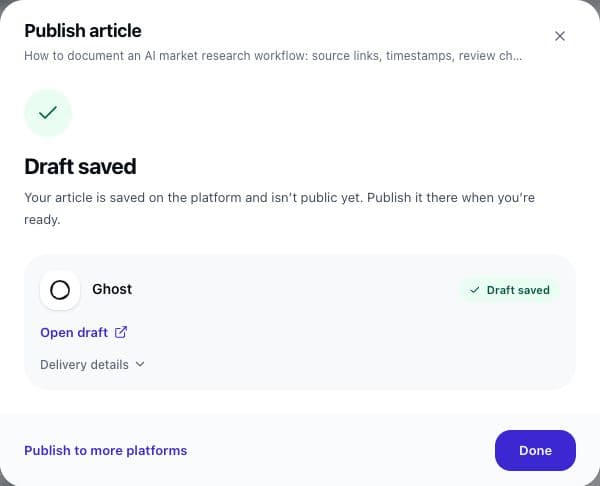
- What the dialog becomes after you click Publish. One row per platform, refreshed every two seconds until each one confirms or fails.
- Publishing history
- The list in the right rail, and the collapsible Publishing history inside the dialog. Every export and delivery for this article, newest first, with time, message, warnings, and a link when the platform returned one.
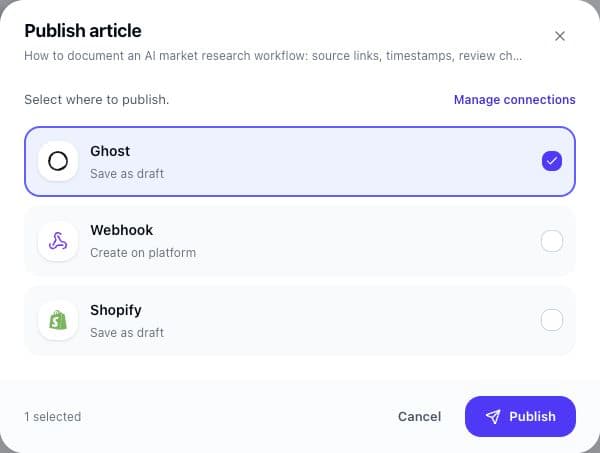
What happens when you click Publish
- 1
Serpio approves the article if needed and freezes a snapshot
The exact revision that passed checks is stored with the request. Editing the article afterwards does not change what is sent to the platforms in that request.
- 2
One delivery is queued per selected platform
Each has its own status. If the hero image is still generating, deliveries wait with the label Waiting for hero image and continue on their own. A failed hero does not block delivery; the article goes without it.
- 3
A worker sends the article and waits for confirmation
Only an explicit draft, live, or created confirmation from the platform counts as success. An accepted request without a confirmed state is treated as uncertain.
- 4
The result is recorded
The article's status pill changes to Sent once at least one platform has confirmed the current revision. Each platform keeps its own entry.
Every status and what to do
| Label | Meaning | Next action |
|---|---|---|
| Publishing… | Queued or being sent. | Wait. You can close the dialog; the result lands in Publishing history. |
| Waiting for hero image | The hero is still generating. | Nothing. Delivery resumes automatically when it finishes or fails. |
| Still publishing | Serpio is continuing a durable request after a temporary platform interruption. | Nothing. Serpio continues in the background with capped backoff. |
| Draft saved | The platform confirmed an unpublished post. | Click Open draft, review, and publish from the platform. |
| Live | The platform confirmed a public post. | Click View live article and check it. |
| Created | A webhook receiver accepted the payload. | Check your receiver. Serpio does not know what it did next. |
| Action needed | Credentials, permissions or destination settings require you. | Read the advice, fix the connection, then click Publish on the entry. |
| Check destination | Delivery uncertain. The platform did not confirm either way. | Click Check on platform, look for the article, then follow the flow below. |
| Exported | You copied or downloaded the article. | Publish it yourself, then use Published it manually?. |
The results heading summarises the batch as "Draft saved", "Drafts saved", "Published live", "Article sent", "Action needed", or "Check the publication status". Two more headings flag a gap between what you asked for and what happened: "Saved as draft, not live yet" and "Published live instead of draft". Both mean the platform confirmed a state different from your connection setting. Open the platform and review.
Automatic retries, and what is never retried
Serpio retries on its own only when it is certain the platform rejected the request before doing anything with it. In practice that means an HTTP 429 rate limit. Those deliveries show Retrying shortly and try again up to three times, honouring the platform's Retry-After header when present and otherwise doubling the wait from one minute up to a maximum of thirty.
- Rejected credentials, missing permissions, and validation errors are final. They show Publishing failed and are never retried automatically. Fix the connection or the article, then click Publish on the entry. When the cause is the connection, the row adds Review connection →.
- Timeouts, dropped connections, HTTP 5xx responses, and a worker that dies mid-send become Check destination. Serpio does not retry these, because the platform may have created the post before the answer was lost.
- A delivery stuck in the sending state for more than 15 minutes is marked Check destination by a background sweep that runs every five minutes. Its message reads "The worker stopped before Serpio received a definitive provider response. Check the destination before retrying."
The check-before-retry flow
An uncertain delivery is the one case where a careless retry creates a duplicate post. The UI makes you confirm before it will send again.
- 1
Open the platform
Use Check on platform in the results, or the link on the history entry. Look in drafts, hidden, or unpublished posts as well as live ones.
- 2
If the article exists there, do nothing in Serpio
Publish or delete it on the platform. Serpio keeps the entry as Check destination; it cannot mark the delivery confirmed on your behalf.
- 3
If the article is absent, click Publish on the entry
The dialog reopens with that platform selected and a notice: the platform "did not confirm whether the article was created. Check the destination before publishing again to avoid a duplicate."
- 4
Tick the confirmation
"I checked the destination and confirmed this article was not created." The Publish button stays disabled until you do.
- 5
Publish
The same delivery record is reused with your current article content and the connection's current settings. No second record is created.
Why a confirmed destination is never resent
Serpio allows exactly one native delivery per article per platform. Once a platform confirms a draft, a live post, or a created item, that entry is closed. In the Publish article dialog the platform moves under Sent to and cannot be selected again. This is deliberate: Serpio does not edit, promote, or overwrite posts it has already created, so a second send could only make a duplicate.
Two things follow. First, Publish to more platforms, which replaces Publish in the toolbar once the article is sent, only offers platforms that have not confirmed yet. When every connected platform has, the dialog offers Connect another platform instead. Second, edits made in Serpio after a send do not reach the platform. Make them there.
Finding the destination link
- In Publishing results: Open draft, View live article, Open destination, or Check on platform under each row.
- In Publishing history: the same link on each entry, next to the time and any warning.
- On the article card: the Sent to badge with a platform count opens a popover listing each platform, its label, and its URL. "No link provided by platform" appears when the platform returned none, which is normal for webhooks.
- Under Delivery details on a successful row: warnings such as omitted keywords, the last attempt time, and any note about a requested versus confirmed state.
Common questions
Why is Publish offered on some history entries and not others?
The Publish action on a history entry appears for native deliveries that failed or are uncertain. Exports have no retry; export again instead. Confirmed deliveries are closed and are never resent.
Can I cancel a queued delivery?
Not from the UI. If you reject the article before the worker picks the delivery up, it fails with "Delivery was cancelled because the article is no longer approved."
What if I edit the article while a delivery is queued?
A queued delivery checks the article before sending. If the revision changed, it fails with "The article changed after this delivery was prepared. Complete checks and publish the current revision." Deliveries already in flight finish with the frozen snapshot.
Related guides
Manual and scheduled publishing
How manually generated articles differ from scheduler-created articles, and how each destination controls scheduled delivery.
Read guideTroubleshooting publishing connections
Symptom by symptom: blocked popups, rejected credentials, missing destinations, failed tests, reconnect prompts, articles you cannot find, and webhook deliveries that go nowhere.
Read guideHow publishing works in Serpio
Approve an article, choose where it goes, and Serpio creates it there once. The two settings every connection has, the five native destinations, the plan gate, and where to see results.
Read guide