Chapter 08 · Publishing
Send articles to your own endpoint with a webhook
For developers: the connect form, the connection.test event, the signed article.approved payload, HMAC verification in Node.js, idempotency by delivery id, and the security rules Serpio enforces.
Updated Sep 19, 2026 · 6 min read
On this page
A webhook destination is for when none of the native connections fit. Serpio sends each approved article as a signed JSON request to an HTTPS URL you control. Your code decides what to do with it. Serpio only knows whether your endpoint accepted the request.
Before you start
- A paid Serpio plan.
- A public HTTPS endpoint that accepts JSON POST requests.
- A signing secret of at least 32 characters, shared between Serpio and your receiver.
- Access to the raw request body before any JSON parsing. The signature covers the exact bytes Serpio sent.
Connect in Serpio
- 1
Fill in the form
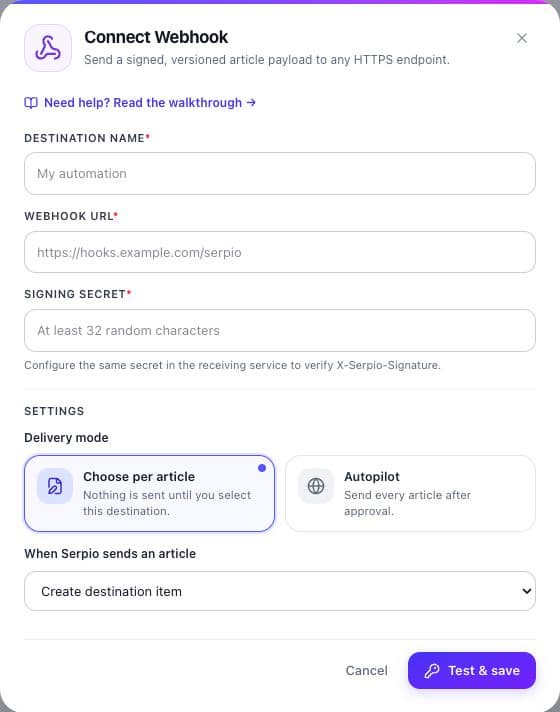
Under Connections, open Webhook and press Connect. Enter a Destination name (shown in Serpio only), the Webhook URL, and the Signing secret. The hint under the secret reads "Configure the same secret in the receiving service to verify X-Serpio-Signature." Serpio encrypts the secret at rest and never displays it again.
- 2
Choose delivery mode
Scheduled articles works as on every connection: review before sending or send automatically. When Serpio sends an article has one option, Create destination item, with a notice: "Serpio sends the article to your webhook. The receiving service controls whether it becomes a draft or goes live; Serpio cannot publish it live directly."
- 3
Press Test & save
Serpio sends a
connection.testevent to your URL, signed exactly like a real delivery. Your endpoint must answer with a 2xx status within 10 seconds. Redirects are not followed. On success the card reads Connected.
{
  "schemaVersion": 1,
  "event": "connection.test",
  "delivery": { "id": "3f0c7d2e-9a4b-4c1d-8e2f-6b7a8c9d0e1f", "test": true }
}Headers and the article payload
| Header | Value |
|---|---|
X-Serpio-Timestamp | Unix time in seconds when the request was signed |
X-Serpio-Signature | sha256= followed by the hex HMAC-SHA256 of timestamp.body under your secret |
X-Serpio-Delivery | The delivery id. For an article this is Serpio's publication id and stays the same across retries of that delivery. |
Content-Type | application/json |
Article deliveries use the article.approved event with schemaVersion 1. The article object is the snapshot frozen at approval, so a retry of the same delivery carries identical content. The body arrives in several forms so you can pick whichever your destination needs.
{
  "schemaVersion": 1,
  "event": "article.approved",
  "delivery": { "id": "6aa7c71d5bc4dec9d0391472", "provider": "webhook", "requestedState": "create" },
  "brand": { "id": "68b2c4d6e8f0a2b4c6d8e0f2" },
  "article": {
    "title": "How to document a research workflow",
    "slug": "how-to-document-a-research-workflow",
    "metaTitle": "How to document a research workflow",
    "metaDescription": "Record sources and review steps.",
    "excerpt": "Record sources and review steps.",
    "text": "Record sources and review steps.",
    "html": "<h2>Why it matters</h2><p>...</p>",
    "markdown": "## Why it matters\n\n...",
    "bodyText": "Why it matters ...",
    "keywords": ["research", "workflow"],
    "tags": ["research", "workflow"],
    "heroImageUrl": "https://res.cloudinary.com/serpio/image/upload/v1/hero.jpg",
    "heroImageAlt": "A notebook and a checklist",
    "author": null,
    "publicationDate": "2026-09-19T08:12:00.000Z",
    "canonicalUrl": null,
    "articleUrl": null,
    "portableDocument": { "schema": "serpio.portable-article", "version": 1, "content": [] },
    "ricos": { "nodes": [] }
  }
}- html, markdown, bodyText
- The same body as sanitized HTML, as Markdown derived from that HTML, and as plain text.
- portableDocument
- A block-structured version of the body (
serpio.portable-article, version 1) for destinations that want structured content rather than HTML. - ricos
- The body as a Ricos rich-content document. Ignore it unless your destination uses that format.
- canonicalUrl and articleUrl
- Set only when the article explicitly has a canonical URL. Serpio never invents one.
- heroImageUrl
- A URL on Serpio's image host; copy the file if you need a local one.
heroImageAltfalls back to the title.
Verify the signature
Compute HMAC-SHA256 with your secret over the timestamp, a literal dot, and the raw body. Compare it to the header in constant time. Reject timestamps more than a few minutes old to limit replay; Serpio's reference receiver uses a 300-second window.
const crypto = require("crypto");
const express = require("express");

const SECRET = process.env.SERPIO_WEBHOOK_SECRET;
const seen = new Set(); // use a database in production

const app = express();
app.post("/serpio", express.raw({ type: "application/json" }), (req, res) => {
  const timestamp = String(req.get("X-Serpio-Timestamp") || "");
  const provided = String(req.get("X-Serpio-Signature") || "");
  const deliveryId = String(req.get("X-Serpio-Delivery") || "");
  const raw = req.body.toString("utf8");

  const age = Math.abs(Date.now() / 1000 - Number(timestamp));
  if (!timestamp || !Number.isFinite(age) || age > 300) {
    return res.status(401).json({ error: "Stale or missing timestamp" });
  }

  const expected = "sha256=" + crypto.createHmac("sha256", SECRET).update(timestamp + "." + raw).digest("hex");
  const a = Buffer.from(provided);
  const b = Buffer.from(expected);
  if (a.length !== b.length || !crypto.timingSafeEqual(a, b)) {
    return res.status(401).json({ error: "Invalid signature" });
  }

  if (seen.has(deliveryId)) return res.status(200).json({ ok: true, duplicate: true });
  seen.add(deliveryId);

  const payload = JSON.parse(raw);
  if (payload.event === "connection.test") return res.status(200).json({ ok: true });
  // article.approved: create the item in your system here.
  return res.status(202).json({ ok: true, deliveryId });
});Idempotency and what your response means
Store X-Serpio-Delivery and process each id once; if you have already handled an id, answer 2xx without creating anything again. Return 2xx quickly and do the heavy work afterwards: Serpio reads only your status code, waits at most 10 seconds, and reads at most 64 KB of the response body.
| Your response | What Serpio records |
|---|---|
| Any 2xx | Created. The article and destination pair is complete; Serpio will not send it again. |
| 429 | Retrying shortly. Serpio retries with backoff, honouring Retry-After up to an hour, for up to three attempts. |
| Other 4xx | Publishing failed. Fix the receiver and publish again from the article. |
| 5xx, a timeout after 10 seconds, or a dropped connection | Check destination. Serpio does not know whether you processed it and will not retry until you confirm the article is absent. |
Security rules Serpio enforces
- HTTPS is required in production. HTTP and other schemes are rejected before anything is sent.
- URLs with embedded credentials are rejected: "Webhook URLs cannot contain embedded credentials."
- Every address the hostname resolves to must be public. Private, loopback, and link-local addresses fail with "Webhook host resolves to a private or unsafe network address."
- Redirects are never followed. Point Serpio at the final URL.
- The signing secret must be at least 32 characters. Shorter secrets fail the test with "Webhook signing secret must be at least 32 characters."
Testing locally and common rejections
Serpio calls your endpoint from its servers, so localhost and private addresses are refused in production. Expose your local server through an HTTPS tunnel and use the tunnel URL in the form. Press Test & save to receive a connection.test, then approve one article, tick the webhook in the Publish article dialog, and press Publish. One delivery per article and destination is the rule, so use a fresh article for each test.
- Signature mismatch: your framework parsed and re-serialized the JSON before you signed it. Verify against the raw bytes.
- The test passes but articles fail: the receiver accepts the small
connection.testbody but rejects larger requests. Check its body size limit. - Duplicate items: the receiver ignores
X-Serpio-Delivery. Store the id before creating anything.
See Troubleshooting connections for the connection side, and Publishing history and retries for the delivery states.
Common questions
Can Serpio publish live through a webhook?
No. Serpio delivers the payload and records the result as Created. Whether the item is a draft or public is your receiver's decision.
Does the delivery id change on retry?
No. A retry of the same delivery reuses the same X-Serpio-Delivery value, so deduplicating on it is safe.
Can I add an Authorization header?
Not in the connection form. Verify the HMAC signature instead; it proves the request came from Serpio and was not altered.
Related guides
How publishing works in Serpio
Approve an article, choose where it goes, and Serpio creates it there once. The two settings every connection has, the five native destinations, the plan gate, and where to see results.
Read guidePublishing history, delivery statuses, and retries
What each publishing status means, what Publishing results and Publishing history show, when Serpio retries on its own, and how to retry safely after an uncertain delivery.
Read guideTroubleshooting publishing connections
Symptom by symptom: blocked popups, rejected credentials, missing destinations, failed tests, reconnect prompts, articles you cannot find, and webhook deliveries that go nowhere.
Read guide