Chapter 08 · Publishing
Connect DEV Community or another Forem site
Generate an API key under Settings → Extensions, connect with the Forem URL, and see how Serpio sends Markdown, a cover image, a canonical URL, and up to four tags.
Updated Sep 19, 2026 · 5 min read
On this page
DEV Community runs on Forem, and so do other community sites built on the same software. Serpio's DEV / Forem connection works with any of them: you give it the site's URL and an API key for the author, and Serpio creates articles as that author, in Markdown.
Before you start
- A paid Serpio plan.
- An account on DEV or the Forem site, belonging to the person who should appear as the author. Articles are created by the API key's owner.
- The site's public base URL. For DEV Community that is
https://dev.to, which the form fills in for you.
Create the API key
- 1
Open Extensions
Sign in to DEV or your Forem site as the author. Open Settings → Extensions.
- 2
Generate a key
In the API keys section, enter
Serpioas the description and generate a key. Copy it now; Forem shows the value once.
Connect in Serpio
- 1
Open the card
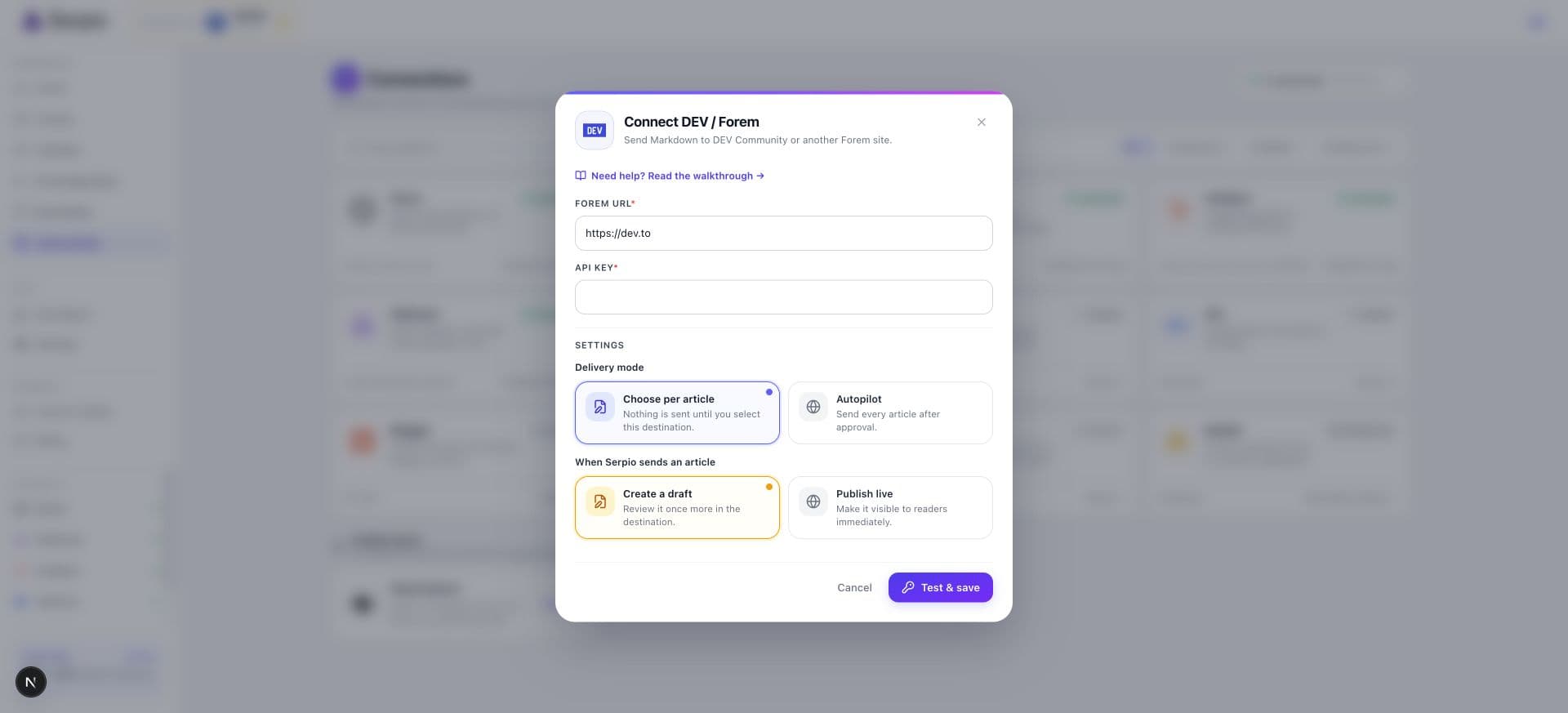
Under Connections, open DEV / Forem and press Connect.
- 2
Enter the Forem URL
The Forem URL field defaults to
https://dev.to. For another Forem instance, replace it with that site's base URL, without a path. - 3
Paste the API key and test
Paste the key into API key, leave Scheduled articles on Review before sending and When Serpio sends an article on Create a draft, and press Test & save. Serpio asks the site who the key belongs to and shows Connected as followed by that author's name. Nothing is created.
How Serpio sends an article
Forem stores article bodies as Markdown, so Serpio converts its HTML body to Markdown and sends that. The delivery happens in two calls, and knowing that helps when you read a result.
- 1
Create an unpublished article
Serpio creates the article with the title, Markdown body, cover image, description, and canonical URL, always as unpublished. DEV's create endpoint handles tags inconsistently, so Serpio does not send them here.
- 2
Update it with tags and the final state
Serpio then updates that same article with up to four tags and sets it to published only if the connection is on Publish live. On Create a draft it stays unpublished.
If the second call fails, the article exists as an unpublished draft with no tags, and Serpio reports the failure. Check your DEV dashboard before retrying so you do not end up with two drafts.
| Article content | In DEV or Forem |
|---|---|
| Title | Title |
| Body | Markdown body |
| Hero image | Cover image, by URL. Alt text is not sent; Forem has no field for it. |
| Meta description or summary | Description |
| Canonical URL | Canonical URL, only when the article explicitly has one. Otherwise DEV assigns its own. |
| Keywords | Up to four tags, normalized |
| Slug, SEO title | Not sent. Forem builds the URL from the title. |
How tags are normalized
Forem tags are lowercase and alphanumeric, and DEV allows at most four per article. Serpio takes the article's keywords in order and, for each one, lowercases it, strips accents, removes spaces and punctuation, and cuts it to 30 characters. Duplicates are dropped, then the first four survivors are sent. "Content marketing" becomes contentmarketing; "SEO and GEO" becomes seoandgeo. If you want specific tags, edit them in the DEV editor before publishing.
Draft or live
Create a draft leaves the article unpublished. It appears in your DEV dashboard under drafts, visible only to you, and Serpio's result reads Draft saved. Publish live publishes it at the end of the second call, and the result reads Live. Live articles on DEV are public community content immediately, shown in feeds and indexed, so send a few drafts first and read them in DEV's editor. Switching the connection to live later does not publish drafts that already exist.
When something fails
- If the key is rejected, the card changes to Reconnect. Generate a new key under Settings → Extensions, press Reconnect credentials, paste it, and press Test & reconnect. Settings are kept.
- If DEV answers with a server error or times out, the result reads Check destination. Look in your DEV dashboard for an unpublished article with the same title. Only if it is absent, tick "I checked the destination and confirmed this article was not created" in the dialog and publish again.
- If DEV asks Serpio to slow down, the result reads Retrying shortly and Serpio retries on its own.
See Publishing history and retries for how each state is handled and Troubleshooting connections for connection problems.
Common questions
Can I publish under an organization on DEV?
Not from Serpio. Articles are created under the API key's personal account. Move the article to an organization in DEV's editor if you need to.
Why do my tags look different from my keywords?
Forem only accepts lowercase alphanumeric tags, and DEV allows four. Serpio normalizes each keyword and keeps the first four unique results.
Does Serpio work with Forem sites other than DEV?
Yes. Enter that site's base URL in the Forem URL field and use an API key from that site. The same two-step delivery applies.
Related guides
How publishing works in Serpio
Approve an article, choose where it goes, and Serpio creates it there once. The two settings every connection has, the five native destinations, the plan gate, and where to see results.
Read guidePublishing history, delivery statuses, and retries
What each publishing status means, what Publishing results and Publishing history show, when Serpio retries on its own, and how to retry safely after an uncertain delivery.
Read guideTroubleshooting publishing connections
Symptom by symptom: blocked popups, rejected credentials, missing destinations, failed tests, reconnect prompts, articles you cannot find, and webhook deliveries that go nowhere.
Read guide